Maler for bryllupsplanlegging
Seks maler, i den rekkefølgen du får bruk for dem. Alle åpnes i nettleseren, krever ingen konto og fungerer uansett om du noen gang bruker Gathmo.
Hvilken mal du trenger, og når
Rekkefølgen er viktigere enn selve malene. Hver av dem bygger på svaret fra den forrige: En bordplan trenger en gjesteliste, en gjesteliste trenger et budsjett, og et budsjett trenger bare en samtale.
- Start her
Budsjettkalkulator
Fordeler totalsummen mellom kostnader som følger gjesteantallet, og kostnader som ikke gjør det. Begynn her: Budsjettet setter rammen for alle malene som følger.
- Deretter
Mal for gjesteliste
Åtte kolonner og A/B/C-metoden. Budsjettet avgjør hvor lang listen kan bli, og derfor kommer den som nummer to.
- Når listen er avklart
Sjekkliste for bryllup
Tilpasser hele planen til tiden dere faktisk har, i stedet for å forutsette tolv måneder.
- Når svarene kommer
Bordplan
Trenger gjestelisten med gruppene fylt ut. Det er derfor gjestelisten har en egen gruppekolonne.
- Seks uker før
Tidsplan for dagen
Legg inn tidspunktet for vielsen, så faller resten av dagen på plass rundt det, både før og etter.
- Før utskrift
Skiltmal
Teksten, navnene deres og en fil som er klar til utskrift. Det siste dere trenger, og det mange utsetter lengst.
Hva en mal ikke kan gjøre
En mal samler beslutningene, men tar dem ikke for deg. Den stopper også ved selve dagen. Ingen regneark samler bildene gjestene tar. Til det trenger du noe gjestene kan bruke med tre trykk, og det er det Gathmo gjør.
Spørsmål om maler for bryllupsplanlegging
Nei. Budsjettet og gjestelisten gjør mesteparten av jobben, fordi resten bygger på dem. Hvor nyttige de fire andre er, avhenger av hvor sammensatt dagen deres blir.
Nei. Alle verktøyene kjører i nettleseren. De som lager en fil, som skiltmalen og tidsplanen, gir deg filen til slutt. Du trenger verken konto eller e-postadresse.
Malene med lister er laget for å kopieres til deres eget regneark, nettopp slik at to personer kan åpne dem samtidig. Et delt regneark løser den oppgaven bedre enn en planleggingsapp.
Følg rekkefølgen ovenfor. Hvert trinn bygger på svaret fra det forrige. Det er lett å miste en hel helg på å lage bordplan før gjestelisten er avklart.
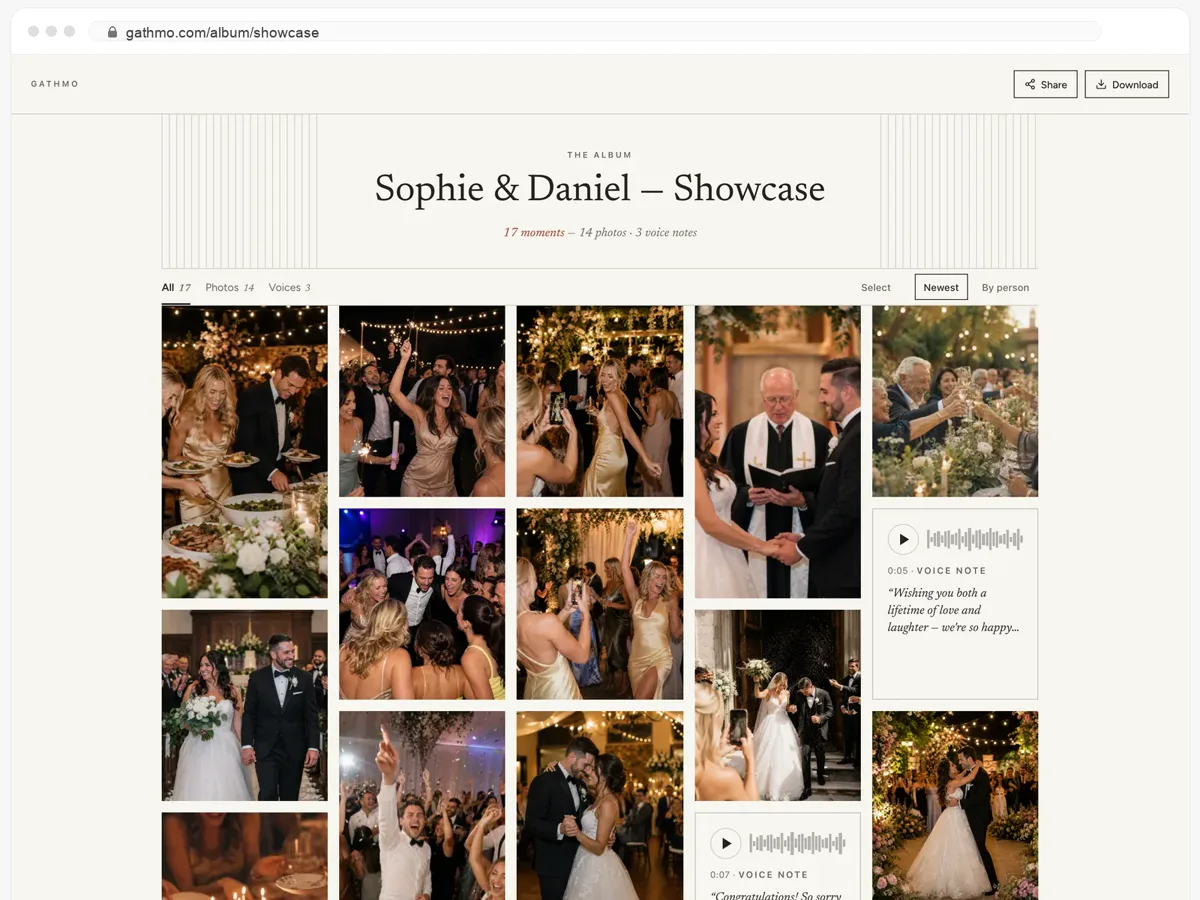
Gjestene deres får hele albumet — og kan laste det ned.
- Bilder, videoer og talemeldinger, alt på én side.
- Gjestene åpner lenken og laster ned det de vil ha.
- Åpent, eller bak et passord — dere bestemmer.
Fra 49 USD. Betal én gang, per arrangement.
Ingen abonnement for arrangører. Gratis å starte, oppgrader bare når du trenger mer.
- 60 bilder, videoer og talemeldinger
- 5 GB lagring inkludert
- Ubegrenset antall gjester — ingen app nødvendig
- Album i 30 dager
- Video inntil 30 sek · tale 30 sek
- Ingen Gathmo-merking på mediene dine
- Ingen nedlasting i originalkvalitet
- Ubegrenset med bilder, video og lyd
- 50 GB lagring inkludert
- Last ned alle originaler (ZIP)
- Ingen Gathmo-merking på mediene dine
- Album i 90 dager
- Video inntil 5 min · tale Ubegrenset
- Modereringsverktøy for arrangøren
- Alt i Essential
- 100 GB lagring inkludert
- Live fotovegg i lokalet
- Album i 6 måneder
- Video inntil 10 min · tale Ubegrenset
- Prioritert support
- Alt i Celebrate
- 250 GB lagring inkludert
- Direktesending for dem som ikke kan komme
- Talemeldingene skrives ut som tekst for deg
- Egen lenke — gathmo.com/c/ditt-navn
- Album i 1 år
- Video inntil 15 min · tale Ubegrenset
Malene hjelper dere frem til dagen. Dette tar vare på det som skjer.
Én QR-kode på bordkortene samler gjestenes bilder, videoer og talemeldinger i ett privat album. Ingen app for gjestene, gratis å starte og lagret i EU.