Disposable cameras or a QR code at your wedding? The 2026 cost math


The verdict
Neither choice is wrong, and the deciding factor is not image quality. It is which cost scales with your guest list. Film costs are per camera, so they climb in a straight line as the wedding grows; a QR album is flat at any guest count. If you want film, buy it for the object rather than the economics -- nothing digital reproduces grain, light leaks and the wait. If you want the night from every angle without a lab bill that scales alongside the seating plan, put a code on the tables. For most weddings, running a handful of cameras for the ritual alongside a QR album for the coverage is not a compromise. It is simply the better plan.
| Feature | QR guest album | Disposable cameras |
|---|---|---|
| Cost behaviour | Flat, any guest count | Per camera |
| See photos on the night | Yes | No -- after developing |
| Works without mobile signal | Upload later | Yes |
| Physical keepsake | Prints on request | Yes, film |
| Simultaneous use | Every guest at once | One person per camera |
| Retakes | Yes | No |
Choose QR guest album if…
- You want photos from the whole room, not one table.
- Your guest list is big enough that per-camera costs add up.
- You would like to see the reception before the thank-you cards.
Choose Disposable cameras if…
- The grain and the surprise are the point.
- Your venue has no usable mobile signal.
- You want a shoebox of prints rather than a folder of files.
Most couples do not want a verdict here. They want a number.
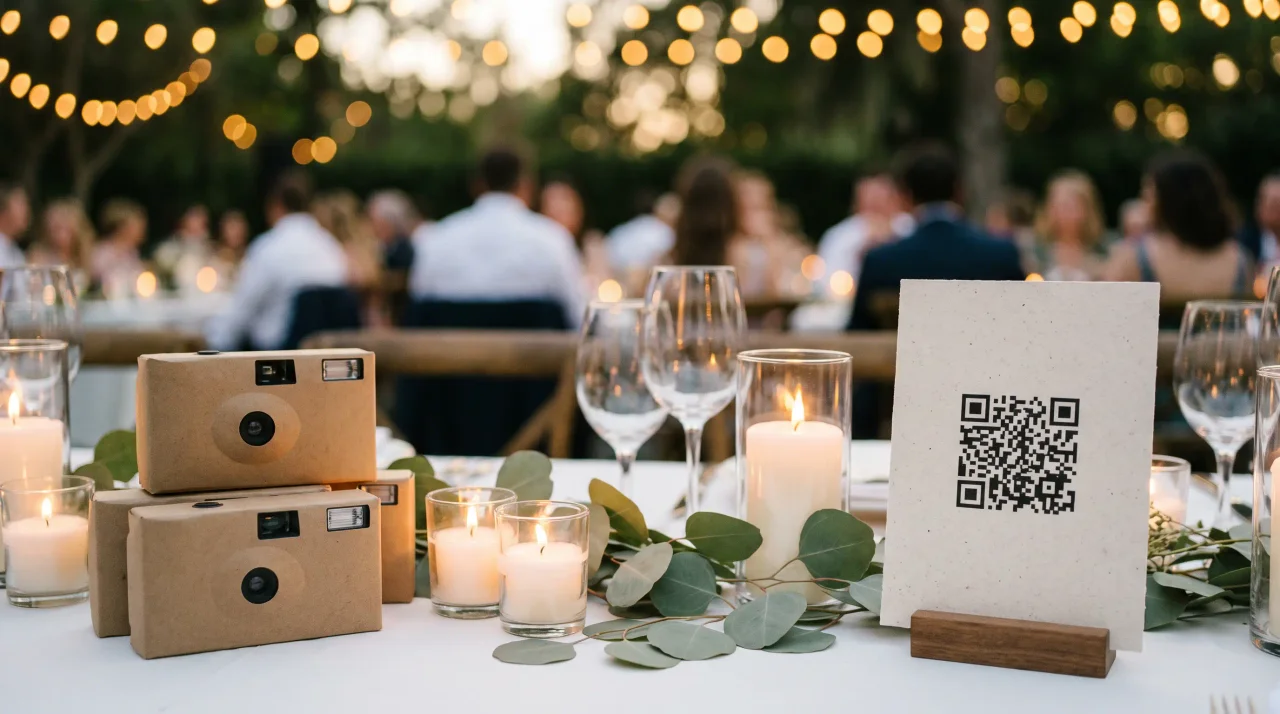
You have seen the table shot: a little cardboard camera by the place cards, and a sign asking guests to take a few frames. It is a lovely idea. Before you buy twenty of them, it helps to know what the whole exercise costs once the film comes back -- and what a QR code guest album does differently.
Here is the honest arithmetic, and where each option genuinely wins.
What does a wedding disposable camera actually cost?
The camera is the cheap part. Getting pictures out of it is where the money goes.
Process One, a US film lab, publishes its price list openly (Process One Photo, retrieved 2026-08-05).
| Service | Price |
|---|---|
| Disposable camera film developing | $5.99 |
| Scan only, no prints ordered | $8.99 |
| Digital scans added alongside prints | $4.99 |
| 4x6 prints, first set | $0.49 each |
| 5x7 prints | $0.79 each |
Read that table carefully. The cheaper scan price has a condition attached: scans cost $4.99 only when you also order prints. On their own they are $8.99.
Digital files and no prints means $5.99 developing plus $8.99 scanning. That is $14.98 per camera, before you buy the camera itself. It is arithmetic on a published price list, not an estimate.
Why the per-camera maths matters more than the price
Every number above is a per camera number. That is the part couples miss.
Twenty cameras means twenty developing fees, twenty scan fees, and twenty cardboard objects to gather at the end of the night. The cost does not flatten as the wedding grows. It climbs in a straight line.
A QR code behaves the opposite way. One sign, one code, one album. Whether ten guests scan it or two hundred, the price does not move. That single structural difference is what this whole comparison turns on.
What you give up, stated plainly
- The flash has a short reach. Receptions run indoors and late, so a table beyond that range comes out dark.
- The viewfinder is not the lens. What a guest framed and what the lens recorded are slightly different pictures.
- Film is finite. Twenty-seven exposures is twenty-seven exposures, with no preview and no retake.
- Nobody sees anything for weeks. Film must be collected, transported and developed.
Dramatic figures circulate -- a third blurry, half the cameras never returned. Every one I could trace led back to a company selling a digital alternative, and none published a method or a sample size. I am not going to repeat a competitor marketing number as though it were research.
When a disposable camera is the right call
Sometimes it is, and it would be dishonest to bury this. If you want the object -- the grain, the light leaks, the surprise of not knowing -- a phone does not give you that. Film looks like film, and the waiting is part of the pleasure.
Cameras also work with no signal. Barns, cellars and hillsides defeat mobile coverage, and cardboard does not care. And the camera on the table is a prompt. It invites people who would never open an app.
Where the QR code changes things
A QR code puts the camera your guests already carry to work. They scan a sign, an upload screen opens in the browser, and the photos land in one private album. No app to install, no account to make, and the pictures appear while the party is still happening.
Gathmo is my own product, so weigh the next paragraph accordingly. The figures below trace to our published plan limits, not to a sales page.
Our free tier is genuinely free, but it caps an album at 20 items, and that cap binds fast at a wedding. Twenty photos is one table having fun. Essential removes the item cap, drops the watermark and keeps the album for 90 days. Celebrate extends retention and adds the live photo wall.
I mention the 20-item cap because "from free" is technically true and practically misleading for a wedding. You would find out at the reception.
Most couples should just do both
This answer rarely gets written down, because it does not suit anyone selling one option. Put four or five cameras out for the look and the ritual. Put a QR sign on every table for the coverage.
You get the film keepsake without funding twenty developing runs, and you still see the reception from two hundred angles. It also fails more gracefully: if the film disappoints, you still have the album. For a head-to-head on the two formats, see Gathmo vs disposable cameras.
Frequently asked
Fewer than the usual advice suggests, if you are also running a QR album. One camera per two or three tables creates the ritual. Buying one per table mostly multiplies your developing bill.
Yes. Labs scan the negatives. At Process One, scanning without prints is $8.99 on top of the $5.99 developing fee. Ordering prints at the same time drops scanning to $4.99.
Not with a browser-based album. The scan opens a web page and the upload happens there. Anything requiring an install loses the guests you most want photos from.
This is the real argument for film. If coverage is poor, keep the cameras and treat the QR album as a next-morning upload. Guests can scan and upload once they are home.
Beyond a handful of cameras, yes, because the digital cost is flat and the film cost is per camera. At a very small wedding with three or four cameras, the difference is not worth agonising over.
 Guide
GuideVideo Guestbook for Weddings: How It Works, Costs, and the Best Setup
Compare video guestbook costs from €0 to €99+, see how wedding video messages work, and follow a practical 5-step setup for signs, prompts, and backups.
 Guide
GuideWedding Guestbook Alternatives: 20 Digital, Audio, Video, and Traditional Ideas
Compare 20 wedding guestbook alternatives across digital, audio, video, photo, and traditional formats, with practical setup tips for choosing well today.
 Guide
GuideAudio Guestbook Sign Wording: 25 Prompts and Printable Templates
Copy 25 audio guestbook sign prompts, five wording templates and two printable layouts, with clear QR instructions that wedding guests can follow on the day.