Video Guestbook for Weddings: How It Works, Costs, and the Best Setup

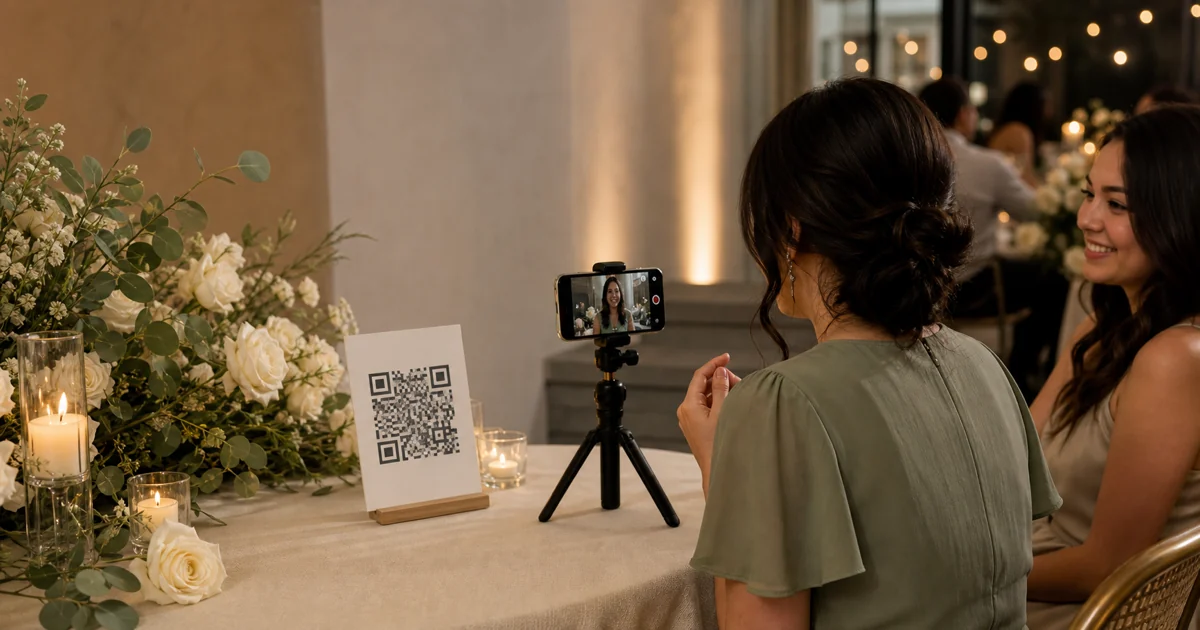
A wedding video guestbook is a collection of short messages from guests, not only clips of the dance floor. Most current tools use one of two capture methods. Guests scan a QR code on their phones, or they record on a shared phone or tablet. Both can work. The better choice depends on your venue, budget, and guests.
This guide covers the practical details that product pages often separate: current costs, recording limits, sign copy, lighting, venue connectivity, privacy, moderation, and backups. If you want the product overview first, see Gathmo's wedding video guestbook.
Disclosure: Gathmo is our product and appears in the cost comparison. For this guide, we tested every cited source link and checked competitor prices and features on 27 July 2026. We did not test every competitor's full guest journey. Verify the offer again before buying.
- A video guestbook records direct-to-camera wishes; ordinary video sharing collects any event clip.
- Public prices checked in July 2026 range from free test plans to $99 or €99 one-time options.
- For many weddings, the strongest setup is a guest-phone QR flow plus one quiet, well-lit recording corner.
- Test permissions, venue internet, moderation, downloads, and retention before printing the final sign.
What Is a Wedding Video Guestbook, and How Does It Work?
In 2026, leading QR video guestbooks describe a three-step flow: create the event, place the QR code, then collect and download messages. Celebrate.buzz's Wedding Video Guestbook and Wed.tv's Frequently Asked Questions both document this model. The guest needs a camera, microphone, browser, and working connection.
A real video guestbook asks the guest to address the couple. A normal shared album may also accept videos, but those clips could show the first dance, table decorations, or a crowded dance floor. Both are useful. They do different jobs.
The usual flow looks like this:
- The couple creates a private event page.
- The host shares a QR code and a backup link.
- A guest opens the page and records or uploads a message.
- The host reviews, hides, or removes clips where the tool supports moderation.
- The couple downloads the originals or receives an edited montage.
Some services combine video messages with photos, written notes, voice messages, or a live wall. Others focus on a final edited film. Check the deliverable before comparing prices. Raw clips, a hosted gallery, and an edited montage are not interchangeable.
Remote guests can contribute when the link remains open outside the reception. GUESTPIX's What is The GUESTPIX Guestbook? explicitly suggests video messages for people who cannot attend. That makes the format useful before and after the wedding, not only during dinner.
The most useful distinction is intention. A guestbook prompt asks, "What do you want to say to us?" A shared album asks, "What did you see?" One event can collect both behind the same QR code.
A wedding video guestbook records spoken, direct-to-camera messages for the couple. Current vendor workflows use a QR code or event link, then let the host review and download the results. General video sharing collects footage of the event; the guestbook adds an explicit prompt and a message addressed to the hosts.
Which Video Guestbook Setup Should You Choose?
In 2026, Apple Support's Lock iPad to one app with Guided Access documents a single-app mode. Android Help's Pin & unpin screens offers a similar control. Those features make a shared-device station safer, but they do not solve discovery. Guests still need a visible invitation and a reason to record.
| Setup | Best for | What guests do | Main trade-off |
|---|---|---|---|
| Guest-phone QR flow | Most weddings, remote guests, multiple rooms | Scan and record on their own phone | Depends on mobile data or venue Wi-Fi |
| Shared phone or tablet | A deliberate guestbook station | Use one mounted device | Can create a queue and needs power, security, and cleaning |
| Pre-event group video | Surprise films and guests who cannot attend | Follow a link before the wedding | Captures less reception atmosphere |
| Staffed video booth | Polished sound, light, and consistent framing | Record with an operator | Usually costs more and takes more space |
For many weddings, start with the guest-phone QR flow. Add one supported corner with soft light, a stable stand, and a helper. Guests can still use their own phones elsewhere. The corner simply gives camera-shy or less technical guests a clearer place to start.
Use a shared tablet when the station itself is part of the experience. Turn on Guided Access or app pinning, hide notifications, connect permanent power, set a separate passcode, and test auto-lock. Never leave a personal device open to messages, photos, or payment apps.
Choose a pre-event flow when remote participation matters more than reception energy. Choose a staffed booth when consistent production quality matters more than a low-friction, distributed setup.
Distribution and production are separate decisions. QR cards distribute the invitation. A recording corner improves light, sound, and confidence. You do not have to force one object to do both jobs.
A shared-device video guestbook needs more than a tripod. Apple Guided Access and Android app pinning can restrict a device to one app. The host must also manage power, auto-lock, notifications, connectivity, and physical security. A QR flow avoids the shared-device queue by letting guests use their own phones.
How Much Does a Wedding Video Guestbook Cost?
As of 27 July 2026, published entry prices start at €0 for Gathmo's test tier and $49 for Video-Guestbook.com's digital product. GUESTPIX Classic starts at €39, while Celebrate.buzz lists $99. These are different deliverables, currencies, limits, and retention models. Treat the table as a dated shortlist, not a permanent ranking.
Full disclosure: Gathmo is our product. Its figures below come from the live product constants. All other figures come from the named vendor's current pricing or help page.
| Product | Public price checked 2026-07-27 | Video guestbook detail | What to verify |
|---|---|---|---|
| Gathmo | €0 Free; €29 Essential; €69 Celebrate; €89 Grand | Free includes 20 total items and 30-second videos. Paid tiers allow unlimited items with 5, 10, or 15-minute video caps | Local currency, retention, live wall, ZIP export |
| GUESTPIX | €39 Classic; €79 Signature; €99 Luxe | Wedding packages list video guestbook, photos, videos, and live slideshow | Upload window, design level, 1,000-guest fair-use maximum |
| Wed.tv | From €49 one-time | Photos, videos, messages, moderation, live display, and premium ZIP export | Plan capacity, total video allowance, storage |
| Celebrate.buzz | $99 | Unlimited guest video submissions; free to start, pay before download | Download window, editing, published USD price |
| Video-Guestbook.com | $49 digital; $79 Wedding Kit | QR recording, raw clips, and vendor-edited film | Internet requirement, kit availability, delivery terms |
| Guestbook.tv | Free test; £25 Silver; £60 Gold; £175 Diamond | Free includes 10 guests and one total video minute; paid tiers increase total minutes | Currency view, guest limit, total video minutes, branding |
The cheapest sticker price is not always the cheapest complete setup. Ask seven questions:
- Does the plan cap each clip, total video minutes, total uploads, or guests?
- Can guests record in the browser, or must someone install an app?
- Are original clips downloadable?
- Is an edited montage included?
- How long can guests contribute?
- How long is the gallery retained?
- Are printed signs, a tablet, stand, light, shipping, or mobile data extra?
Gathmo's canonical EUR plans use retention as part of the upgrade ladder. The periods are 30 days on Free and 90 days on Essential. They rise to 183 days on Celebrate and 365 days on Grand. Other vendors publish different windows. Download the files before the shortest relevant deadline.
Wedding video guestbook prices are not directly comparable. In July 2026, public options ranged from free test plans to $99 or €99 one-time packages. Some prices cover raw browser recordings, while others include printed kits, live displays, longer storage, higher total video allowances, or an edited film.
Step 1: Choose the Recording Model and Budget
In July 2026, Guestbook.tv's Pricing page measured plans by both guests and total video minutes. Gathmo's product constants instead set per-video limits from 30 seconds to 15 minutes. Decide which constraint matters before buying. A 100-guest plan with five total video minutes is different from unlimited uploads with a per-clip cap.
Write your desired outcome in one sentence:
- "We want raw messages from as many guests as possible."
- "We want one edited film without doing the edit ourselves."
- "We want photos, voice, and video in one private album."
- "We want a staffed, polished booth with consistent lighting."
Then choose who supplies the recording device. Guest phones reduce queues and support remote guests. One shared device creates a visible ritual. A staffed booth controls framing and sound.
Verification: confirm the plan covers your expected event window, lets you export the deliverable you want, and works on the devices your helpers will use. Take a screenshot of the plan details on purchase day.
Step 2: Create the Event and Run Three Tests
Gathmo's 2026 Free tier allows 20 total items, 30-second videos, and 30-day retention. That is enough to test the capture path, not a promise that it suits a full wedding. Whichever service you choose, run three tests: host, fresh guest, and venue.
- Host test: record, replay, moderate, delete, and download a sample.
- Fresh guest test: use a phone that is not signed into the host account. Scan the printed-size QR code and follow the real guest flow.
- Venue test: repeat the upload where the recording corner will stand. Test mobile data and the guest Wi-Fi.
Watch the permission prompts. The browser may ask for camera and microphone access. Confirm the guest sees a clear upload-success message before closing the page.
Test a longer clip than you expect guests to leave. That reveals plan caps, browser timeouts, and slow uploads. Then test a declined permission. Your helper should know how to reopen the site settings without taking the guest's phone away unnecessarily.
Verification: the sample appears in the host dashboard, audio is understandable, the correct privacy setting is active, and the original file can be exported.
Step 3: Write One Prompt and a Clear Video Guestbook Sign
Celebrate.buzz's 2026 Wedding Video Guestbook page says its event can be created in three minutes and recommends visible signage plus an announcement. The useful lesson is not the speed claim. It is the combination of a clear prompt, several invitations, and one spoken reminder.
Use one prompt on the main sign. Keep alternatives with the helper:
- "Tell us your favorite memory of us."
- "Give us one piece of advice for our first year."
- "Record the toast you did not get to give."
- "What should we remember about today?"
- "Leave a message for us to watch on our first anniversary."
A clear sign can say:
Scan the code. Choose video. Share a memory, a toast, or advice. Tap save and wait for the upload confirmation.
Include a short backup link under the QR code. Add a brief privacy line or link near the action, not in tiny print across the room. For a wider placement plan, use the guide to collecting event photos with QR codes. The staged A5 video guestbook sign template includes an editable QR placeholder.
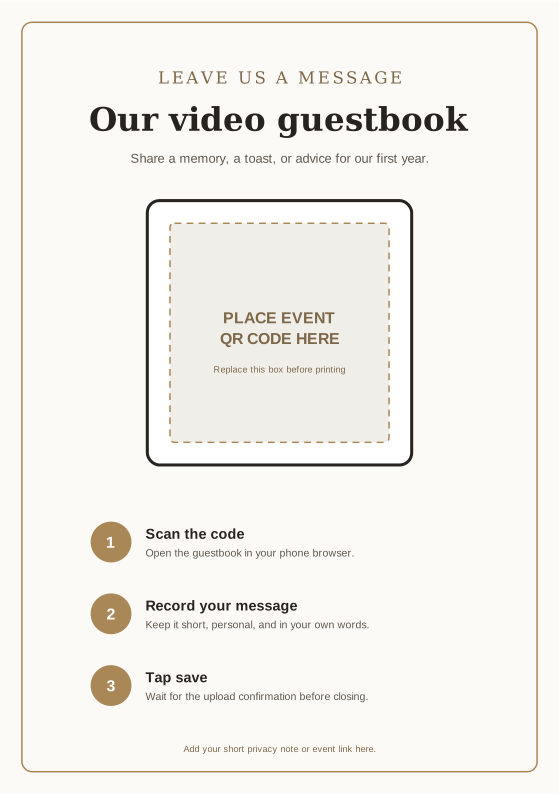
The prompt is the creative direction. "Leave a message" produces hesitation. A specific question gives guests a first sentence and makes the final collection more varied.
Verification: print the sign at final size, then scan it from a normal standing distance. Ask someone who did not write the copy to explain the task after one glance.
Step 4: Build a Recording Corner Guests Will Use
In 2026, GUESTPIX's Unlimited Event Photo Pricing & Packages included more than 180 editable print templates. Its own guidance still recommends table cards and visible placements. Design helps discovery. It cannot fix poor sound, strong backlight, an unstable phone, or a sign hidden behind flowers.
Choose a corner away from speakers, service doors, and harsh windows. Face the guest toward soft light. A plain background usually looks better than a busy walkway. Put the phone at eye level, clean the lens, and lock the stand.
Use two layers of placement:
- small cards where guests pause, such as dining tables or the bar;
- one recording corner where they can speak with less noise and more privacy.
Name one helper. Their job is to point out the guestbook, solve permission problems, check power, and glance at uploads. They should not pressure anyone to record.
If the venue network is weak, display the guest Wi-Fi name and password where appropriate. Video-Guestbook.com's current FAQ says an internet connection is required and recommends venue Wi-Fi when mobile reception is poor.
Verification: record a sample while music and conversation are happening. Replay it without headphones. If you cannot understand every word, move the corner.
Step 5: Plan Privacy, Moderation, and the Final Backup
The European Commission's Principles of personal data processing under the GDPR lists seven principles, including purpose limitation, data minimisation, storage limitation, and confidentiality. For EU events, faces and voices can be personal data. Tell guests what is collected, why, who can see it, and how long it stays available.
This section is general information, not legal advice. Your situation, guests, country, and intended use may change the correct legal basis and notice. The GDPR event-photo guide for hosts covers the broader notice checklist.
Before the wedding:
- decide whether messages are private to the couple or visible in a gallery;
- state the purpose in plain language;
- identify the host or organisation responsible;
- link to the relevant privacy information;
- state the retention or review window;
- provide a contact for access or deletion requests;
- take extra care where children may appear;
- decide whether uploads need approval before a live wall shows them.
The EDPB's event-photo and video FAQ says organisations should determine a lawful basis and inform people in advance. It also notes that legitimate-interest balancing needs particular care when children are involved.
After the wedding, nominate one person to export the originals. Open several downloaded files, not only the ZIP archive. Save at least two copies in separate places. Then decide whether the hosted gallery should remain open.
For EU events, video guestbook planning should cover notice, purpose, access, moderation, retention, and deletion contacts. European Commission GDPR guidance says organisations must explain why data is collected and how long it is kept. EDPB event guidance also says attendees should be informed before photography or filming.
What Usually Goes Wrong With a Video Guestbook?
In July 2026, the six products in this article used at least three different limit models. They include per-clip duration, total video minutes, and guest or item caps. Buying from the headline price alone is the first common mistake. The remaining failures are mostly operational.
The sign asks for uploads, not messages. Guests send dance-floor clips but no direct wishes. Put the prompt on the sign and recording page.
There is one small sign in one busy place. Use table-level reminders and one clear recording corner. Do not make the couple explain the guestbook all evening.
The camera faces a window. Faces become dark. Rotate the setup so soft light falls toward the guest.
The station sits beside a speaker. The image may look good while the speech is unusable. Test during realistic room noise.
Nobody tests the venue network. A QR code can open while a video upload still fails. Complete a real upload at the venue.
The visibility setting is an afterthought. Decide whether messages are private, moderated, or immediately visible before guests contribute.
Nobody owns the export. Put the download date in a calendar before the retention window ends.
The Best Setup Is the One You Test
For many weddings, use a browser-based QR guestbook across the venue, then add one quiet recording corner with good light and a helper. That combination supports spontaneous phone recordings without giving up a clear guestbook moment.
Choose the plan by deliverable and limits, not the lowest headline price. Run the three tests, print one prompt, decide visibility, and assign the final download. If you want photos, voice, and video in one event flow, review how Gathmo works and the current event pricing.
Ready to test the real guest journey? Create a Gathmo event, record one sample message, and check the result before you print the sign.
Sources
- Gathmo, packages/config/src/constants.ts, retrieved 2026-07-27 from the current application repository.
- Celebrate.buzz, Wedding Video Guestbook, retrieved 2026-07-27.
- Video-Guestbook.com, Video Guest Book with QR Code | Get Your Film in 24h, retrieved 2026-07-27.
- Guestbook.tv, Pricing, retrieved 2026-07-27.
- GUESTPIX, Unlimited Event Photo Pricing & Packages, retrieved 2026-07-27.
- GUESTPIX Help, What is the GUESTPIX Free Plan?, retrieved 2026-07-27.
- GUESTPIX Help, What is The GUESTPIX Guestbook? Written and Video Messages, retrieved 2026-07-27.
- Wed.tv, QR Code Wedding Photo & Video Sharing | Digital Guestbook, retrieved 2026-07-27.
- Wed.tv, Frequently Asked Questions, retrieved 2026-07-27.
- European Commission, Principles of personal data processing under the GDPR, retrieved 2026-07-27.
- European Data Protection Board, I am organising an event as part of my business activities, can I make photos and videos of the event and the people attending?, retrieved 2026-07-27.
- Apple Support, Lock iPad to one app with Guided Access, retrieved 2026-07-27.
- Android Help, Pin & unpin screens, retrieved 2026-07-27.
Frequently asked
No. A video guestbook asks guests to record direct messages. Wedding video sharing also accepts clips of the ceremony or party. GUESTPIX's 2026 guestbook help page distinguishes written or recorded guestbook messages, while its wedding packages also accept general videos. One service can offer both.
Not always. Wed.tv's 2026 product page says guests can use a QR code with no app or login. Other setups use a shared iPad app. If you choose a station, Apple Guided Access can temporarily restrict the iPad to one app. Test the exact guest flow before printing.
Use three actions: scan, record, save. Add one prompt and tell guests to wait for upload confirmation. Celebrate.buzz's 2026 setup uses three stages and recommends visible signage plus an announcement. Keep a short backup link near the QR code for guests who cannot scan it.
Give guests a simple target, not a rigid rule. Thirty to 90 seconds is enough for one memory or piece of advice, but check your plan. Gathmo's 2026 limits range from 30 seconds on Free to five, 10, or 15 minutes per video on paid tiers.
Yes, when the service accepts a link outside the venue and the contribution window remains open. GUESTPIX's 2026 guestbook guide specifically suggests video wishes from people who cannot attend. Send the link before the wedding, then one reminder while uploads are still accepted.
It depends on the settings. GUESTPIX's 2026 help page lets hosts keep guestbook content private or show it to guests. Wed.tv says hosts can approve, hide, or delete messages. Check visibility before launch, explain it to guests, and schedule the final export and retention review.
 Guide
GuideWedding Guestbook Alternatives: 20 Digital, Audio, Video, and Traditional Ideas
Compare 20 wedding guestbook alternatives across digital, audio, video, photo, and traditional formats, with practical setup tips for choosing well today.
 Guide
GuideAudio Guestbook Sign Wording: 25 Prompts and Printable Templates
Copy 25 audio guestbook sign prompts, five wording templates and two printable layouts, with clear QR instructions that wedding guests can follow on the day.
 Guide
GuideWedding Photo Booth Alternatives: 7 Fun Options
Compare 7 wedding photo booth alternatives by setup, cost, accessibility, moderation, and keepsake value, then choose a format every guest can enjoy fully.