Getting started
Choose an event type for weddings, parties, or business events
Use Gathmo for weddings, birthdays, parties, corporate events, and other private occasions; the event type labels your setup but does not limit uploads.

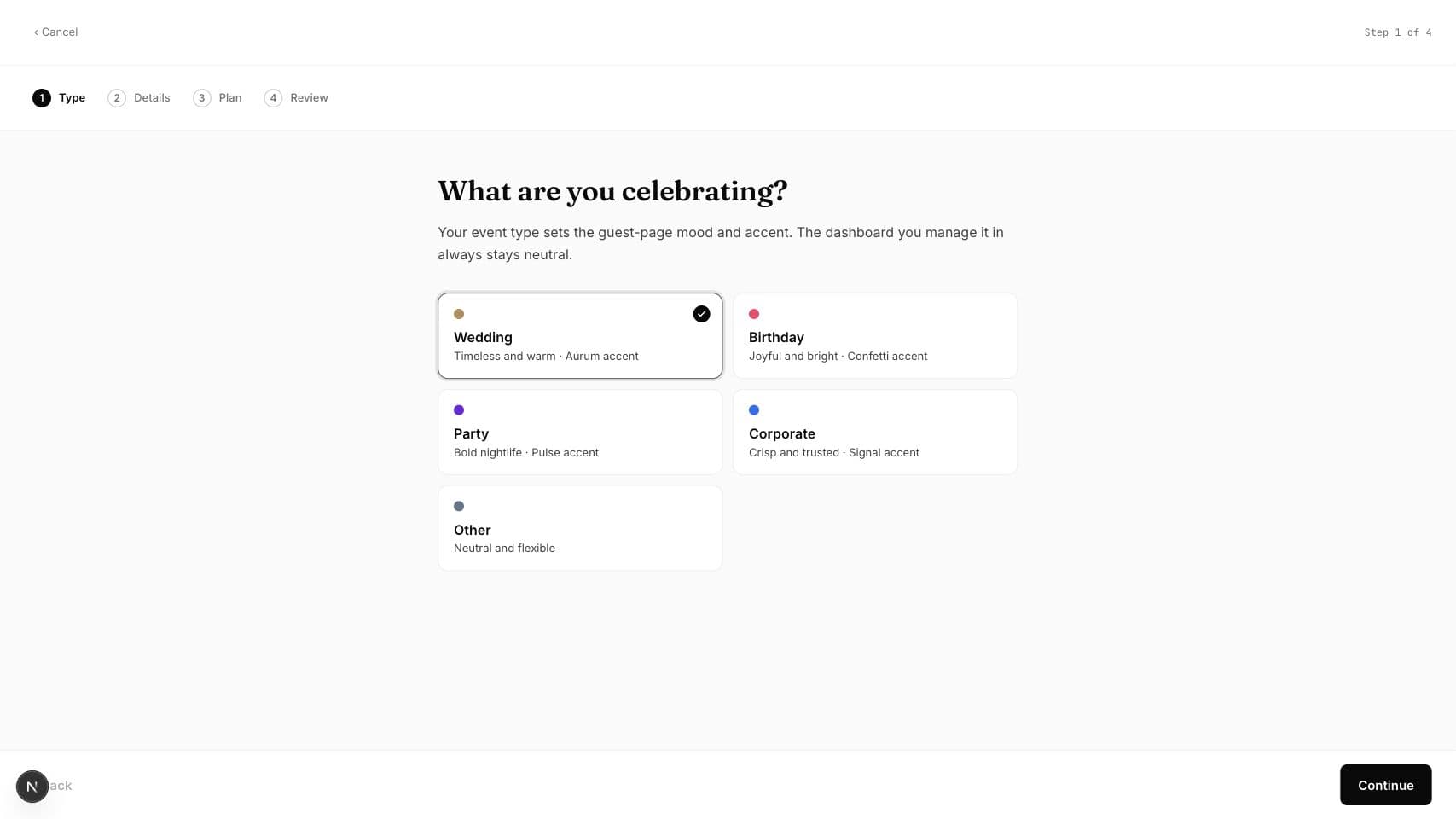
Gathmo works for any lawful private or business occasion where a host wants to collect guest photos, videos, or voice messages. The setup wizard offers Wedding, Birthday, Party, Corporate, and Other; choosing a type organizes the event but does not remove the core upload, QR, album, moderation, or download tools.
Event type guide
| Type | Good fit |
|---|---|
| Wedding | Ceremonies, receptions, wedding weekends, engagements, and anniversaries. |
| Birthday | Children's parties, milestone birthdays, and surprise celebrations. |
| Party | Graduations, reunions, festivals, dinners, and private social events. |
| Corporate | Conferences, launches, offsites, galas, trade shows, and internal events. |
| Other | Memorials, school occasions, charity events, clubs, community gatherings, or any format not listed. |
Before you start
- Know whether one shared album or several private albums are needed.
- Decide who should receive the QR code or link.
- For an organisation, confirm whether a personal event or business workspace fits the ongoing use.
- Open the correct Gathmo event, workspace, or account before making changes.
Steps
1. Choose the closest event type
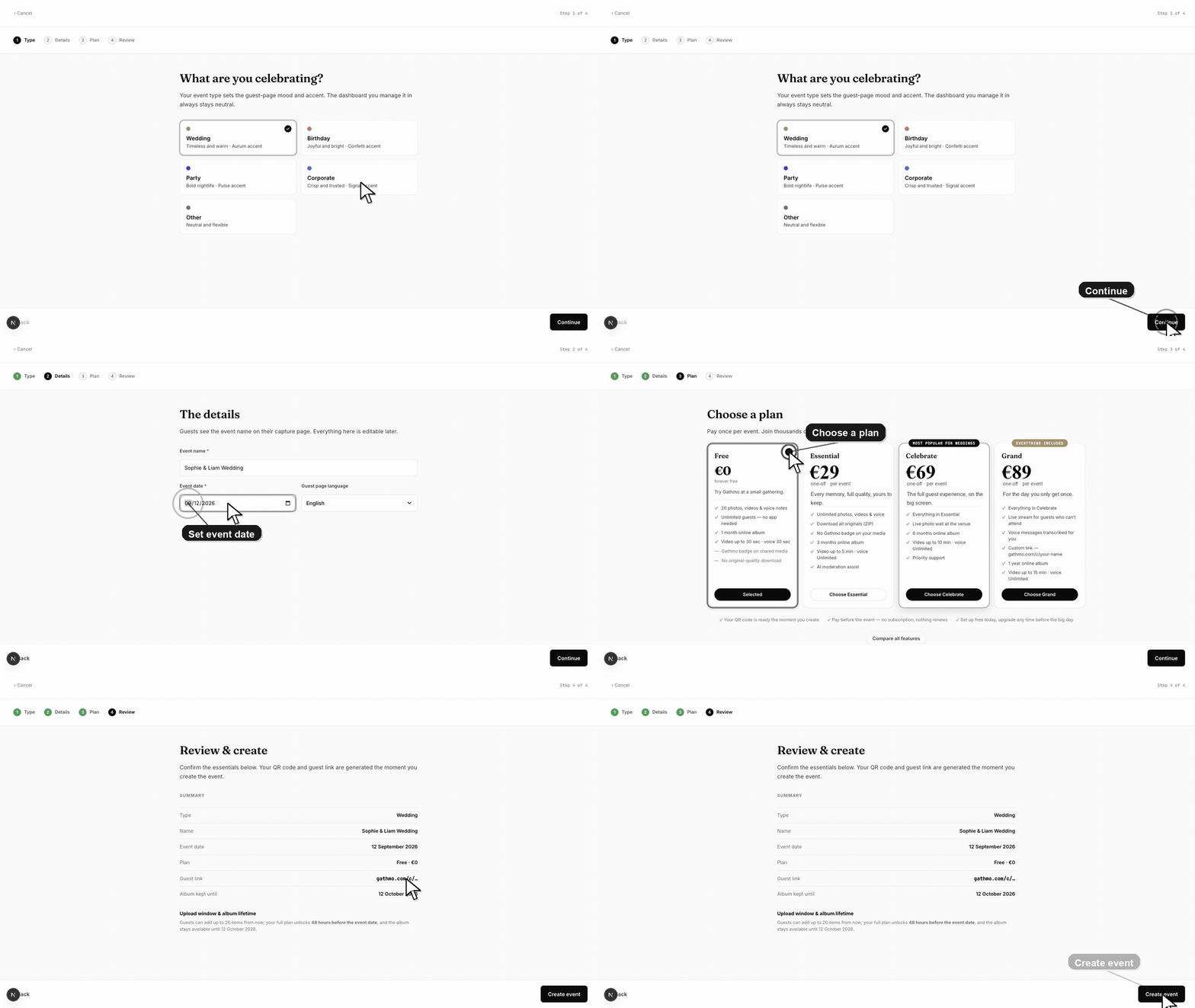
Start a new event and select Wedding, Birthday, Party, Corporate, or Other. Pick the option that best describes the occasion; it is a descriptive setup choice, not an eligibility test.
2. Use Other for a format not listed
Select Other for school events, memorials, charity gatherings, religious occasions, sports clubs, community events, or mixed formats. You still receive the same guest page, QR code, and album workflow allowed by the chosen plan.
3. Give the event a recognizable name
Use a title guests and team members will recognize, such as “Maya and Leo — Wedding Weekend” or “Northwind 2026 Conference.” A clear name is more useful than trying to force a specialized occasion into the wrong type.
4. Configure the media experience
After creating the event, choose whether guests can add photos, videos, and voice messages. Set moderation and album visibility for the audience and sensitivity of the occasion.
5. Split events only when separation is useful
Create more than one event when departments, clients, days, or guest groups require independent links and albums. Keep one event when everybody should contribute to the same collection.
6. Test the chosen setup
Scan the QR code in a private browser window, upload one permitted item, and check what appears in the album. The test confirms the real workflow more reliably than the event-type label alone.
What to do next
- Continue to the event details and plan selection.
- Customize the upload types and moderation mode.
- Share the tested QR code with the intended audience.
- Run the same flow once from a phone, because the host dashboard and guest page solve different parts of the setup.
Frequently asked questions
Can Gathmo be used for any event?
Yes, for lawful occasions that fit the guest-media workflow. Choose Other when Wedding, Birthday, Party, or Corporate is not an accurate label.
Do different event types have different features?
No. Core capabilities come from the selected plan and event settings, not from whether the event is labeled Wedding, Birthday, Party, Corporate, or Other.
Can I use Gathmo for a school or charity event?
Yes. Choose Other or the closest type, apply suitable privacy controls, and use a business plan if the organisation will run events repeatedly or needs branding and team access.
Can I use one event for a conference with several sessions?
Yes, if all sessions should feed one album. Use separate events when each session needs a separate QR code, access group, client deliverable, or media collection.
Troubleshooting
Choose Other. The label does not prevent you from using the standard event tools, and the event name can describe the occasion precisely.
Check the event settings for an editable type or contact support if the label cannot be changed. Do not recreate the event if guests have already received its QR code unless you need a separate album.
Use a business account and compare Studio, Agency, and Enterprise. Consumer event types do not provide the repeat-client workspace and white-label controls of business plans.
Refresh the page, confirm you are signed in to the correct Gathmo account, and open the exact event from the dashboard. If the event was created by another team member, ask them to confirm your role before changing settings.
The event type does not create consent or publicity rights. Hosts remain responsible for an appropriate notice, audience access, and lawful use of guest media, especially for children, employees, schools, and public-facing campaigns.
Keep going