Digital Voice Guestbook: How It Works Without a Phone Rental

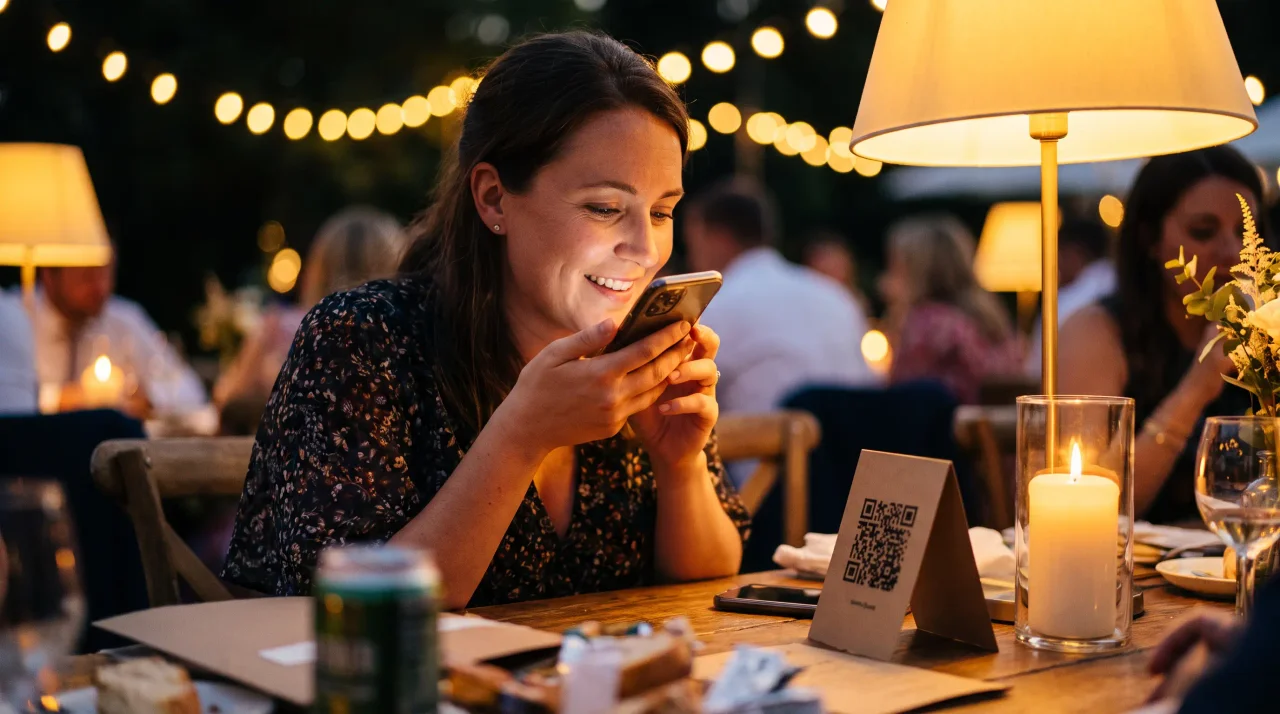
In 2025, Pew Research Center's Mobile Fact Sheet reports that 91% of US adults own a smartphone. That changes the audio guestbook setup. You no longer need one rented phone in one corner. A digital voice guestbook can let every guest record from the phone already in their pocket.
That does not mean phone rentals are wrong. A vintage phone can be a beautiful ritual. If you are still deciding between the two formats, start with our audio guestbook rental vs QR audio guestbook comparison. This guide answers the next question: how do you actually set up the digital version?
Disclosure: Gathmo is our product, and it includes QR-based voice messages. The setup advice below is written for Gathmo, but the core checks apply to any browser-based audio guestbook.
- A digital voice guestbook lets guests scan a QR code and record in their phone browser.
- Pew reports 91% US smartphone ownership, so phone-native recording is practical for most guest lists.
- The setup needs one prompt, visible QR placement, a test recording, and a download plan.
- Do not invent participation goals. Judge success by whether the right people can record easily.
What is a digital voice guestbook?
In 2026, The Knot's "Audio Guest Book" guide explains that audio guestbooks are not limited to specialty phones; some vendors let guests call a number or scan a QR code from personal devices. A digital voice guestbook is that second model: guests use their own phones to leave spoken messages.
A written guestbook captures handwriting. A physical audio guestbook captures the moment of picking up a phone. A digital voice guestbook captures the voice without making that voice depend on a single device, shipment, table, or queue.
The practical difference is distribution. A phone rental usually lives in one place. A QR code can sit on table cards, signs, invitations, and follow-up messages. For a wedding audio guestbook setup, that matters because guests do not all pause in the same corner at the same time.
A better way to think about this is distributed recording. The digital voice guestbook is not only a cheaper phone rental. It turns several natural event moments into recording opportunities.
A digital voice guestbook collects spoken guest messages through a QR or link flow instead of a single rented phone. The Knot notes that audio guestbooks can include QR-code recording from personal devices, which separates the keepsake from the physical phone prop.
How does a digital voice guestbook work for guests?
In 2026, EventShare's audio guestbook page describes a simple digital flow: create an event, share the QR code, then listen to the recordings afterward. In practice, the guest scans, opens the recording page, taps the microphone, saves the message, and the host receives it.
The guest flow should feel shorter than reading this paragraph. Scan. Tap. Speak. Save. If the tool asks guests to install an app, create an account, search for an event code, or wait for approval before recording, the setup has added friction at the worst moment.
- Create the event.
- Print or share the QR code.
- Guests scan and record in the browser.
- The host reviews the messages.
- The host downloads the archive after the event.
With Gathmo, voice messages sit beside photos and videos in the same event album. That is the reason to use the same QR code for the whole memory set. Guests should not need one link for photos, one phone for audio, and one group chat for video. See how the Gathmo QR flow works before choosing sign copy.
A QR audio guestbook works when the guest path is short enough to explain on one sign. EventShare describes a three-step model: create the event, share the QR code, and listen to recordings. Gathmo extends that flow by keeping voice, photos, and video in one event album.
Setup checklist before you print
Zola's 2026 First Look Report reports an average 145-person wedding guest count, with 37% of couples hosting at least one additional event and 18% planning a full 2-to-3-day weekend. That means your voice guestbook should work beyond one reception table.
- An event page with voice recording enabled.
- One QR code and a plain backup link.
- One prompt guests can answer quickly.
- Table cards or signs for the places guests pause.
- A short privacy note and a download plan.
The event page is the technical part. The prompt and placement are the human part. Both matter. A QR code without a reason to speak is just another square on the table. A good prompt tells the guest what kind of memory you want.
If you already use QR code event photo collection, voice can ride on the same behavior. Guests scan once, then choose whether to upload a photo, video, or voice message. That keeps the event simple.
Zola 2026 wedding data points to larger, stretched events: 145 average guests, 37% hosting an additional event, and 18% planning a 2-to-3-day weekend. A digital voice guestbook should therefore work through table cards, entrance signs, invitations, and follow-up links.
How do you create the event and enable voice messages?
Gathmo product constants set the Free tier at 60 items, 30-second voice messages, and 30-day retention; paid tiers unlock unlimited uploads and unlimited voice-message length (`packages/config/src/constants.ts`, 2026). By the end of this step, you should have a testable event page.
In Gathmo, create the event first. Add the event name, event date, and event type. Keep the event private unless you have a reason to make the album broadly shareable. Then confirm voice messages are enabled alongside photos and video.
Your first verification is simple: open the event link on your own phone. Tap the voice option. Check whether the browser asks for microphone permission. Record a short test message, save it, and confirm it appears in the host view.
When we plan a Gathmo voice setup, we treat the first test recording as the real launch point. If the host cannot record, replay, and remove one test message, the signage is not ready for print.
For a small event, Free is enough to test the guest path. For a wedding, the paid tiers are usually about headroom: unlimited uploads, longer videos, unlimited voice length, ZIP download, retention, and live-wall options. Check the current Gathmo event tiers before publishing any price or limit.
Gathmo Free is designed for setup and testing: 60 items, 30-second voice messages, and 30-day retention. Paid event tiers start at EUR29 and unlock unlimited uploads plus unlimited voice-message length, which matters when voice is part of the full event album.
What prompt should guests answer?
The Knot's "Audio Guest Book" guide says setup needs signage and communication, even when instructions are simple. The prompt is the smallest piece of communication. It should answer the question guests silently ask: what am I supposed to say?
Use one prompt per sign. Do not turn the card into a script library. The goal is to remove hesitation, not give guests homework. Good prompts are specific enough to start a story and broad enough for different relationships.
- Tell us your favorite memory of us.
- Leave one piece of advice for our first year married.
- Say the thing you would write in the card, but in your own voice.
- Record a message for us to hear on our first anniversary.
- If you cannot be here today, send us the toast you would have given.
For corporate or professional events, make the prompt less sentimental. Use: "What should the team remember from today?" or "Share one moment from the event worth keeping."
The prompt belongs on the sign and, ideally, on the recording screen. Wedibox also emphasizes prompts in its 2026 QR audio guestbook flow, but treat any vendor-specific results claims as vendor claims until independently verified.
A digital voice guestbook prompt should be short enough to fit on one sign. The Knot setup advice emphasizes communication around audio guestbooks, and vendor pages like Wedibox also center prompt wording. The safe claim is practical: clear prompts reduce guest uncertainty.
QR code placement for better recordings
GuestCam's 2026 audio guestbook guidance recommends placing access where guests already gather, sending the link to remote guests, and printing QR access on signs or table cards. For a digital voice guestbook, placement is the reminder system.
Use the QR code in more than one place, but do not scatter it randomly. Put it where a guest has a natural pause and enough quiet to speak. Tables work for short messages. A bar sign works before the room gets loud. A follow-up link works for remote guests and people who think of their message later.
| Placement | Best moment | Best message type |
|---|---|---|
| Table card | Dinner pause | Advice or memory |
| Entrance sign | Arrival | Short greeting |
| Bar sign | Cocktail hour | Funny note |
| Invitation link | Before event | Remote toast |
| Follow-up text | Next morning | Thoughtful message |
For mixed-age weddings, assign one person to mention the guestbook. The Knot also recommends a DJ or band announcement for audio guestbooks. Do it once, at a natural moment, and keep the ask short.
If you are comparing this setup with a physical station, use the rental-vs-QR comparison already linked above. This page is about the digital setup path.
QR placement should follow guest behavior. GuestCam recommends table cards, remote guest links, and signs where guests already gather. The practical setup is distributed: put the code at tables, entrances, and follow-up messages so recording is not tied to one table.
How do you test the recording path before guests arrive?
The Knot's "Audio Guest Book" guide notes that physical phone guestbooks need practical checks like power and weather protection for outdoor events. Digital guestbooks need a different preflight: microphone permission, signal, QR scan distance, save confirmation, replay, and host moderation.
Run the test on the device guests are most likely to use. If possible, test on both iPhone and Android. Stand where the sign will sit. Scan from the distance guests will actually stand. Record ten seconds. Save it. Then open the host view and confirm the message is there.
- QR code scans from the printed size.
- The recording page opens without login.
- Microphone permission appears clearly.
- A saved recording appears in the host view.
- The host can approve, delete, or hide the test message.
- The backup link works in a text message.
- The sign copy fits in one glance.
The quietest failure is not technical. It is a sign that scans but does not explain why anyone should scan it. Test the words with the same seriousness as the QR code.
A digital voice guestbook is ready only after a full test recording. The host should scan the printed QR, grant microphone permission, save a message, replay it, and verify moderation or deletion. This catches the setup problems that guests should never have to debug.
How do you keep voice messages with photos and video?
Gathmo Essential includes unlimited uploads, 5-minute video, unlimited voice-message length, ZIP download, AI moderation, and 90-day retention; Celebrate extends retention to 183 days and adds live wall; Grand extends retention to 365 days and adds transcripts (`packages/config/src/constants.ts`, 2026). Voice belongs in the same album as the rest of the event.
That context is the real digital advantage. A voice note is stronger when it sits beside the guest photo, video, and the event timeline. The host should not have to manage one audio export, one photo drive, and one group chat.
Use moderation if the event has a public display, corporate audience, or mixed guest group. Then download the archive soon after the event. Cloud retention is useful, but it is not the same as a permanent keepsake in your own storage.
If video messages matter too, connect the setup to video guestbook messages. Some guests will speak more naturally on camera. Others will prefer audio. The best event album gives both options without asking them to learn two systems.
Gathmo paid event tiers make voice part of the broader media archive. Essential at EUR29 includes unlimited uploads, unlimited voice length, ZIP download, AI moderation, and 90-day retention; Celebrate and Grand extend retention and add live-wall or transcript features.
What mistakes should you avoid?
A 2026-retrieved Reddit r/weddingplanning discussion about audio guestbooks mentions practical issues like cost, outdoor sound, sign clarity, and where guests actually record. The pattern is simple: the tool matters, but setup choices shape whether people use it well.
- Printing a QR code with no prompt. Guests may understand how to scan, but not what to say.
- Hiding the QR code in one place. A digital voice guestbook should be placed where guests pause naturally.
- Forgetting microphone permissions. Test that permission step so older guests or less technical guests are not surprised.
- Separating voice from the album. Voice is easier to preserve when it lives beside photos and video.
- Waiting too long to download. Retention windows are not archives.
The most common digital voice guestbook problems are setup problems, not category problems. Reddit weddingplanning comments point to clear instructions, signage, and quiet placement as practical concerns. A good setup gives guests a reason to scan and a calm place to speak.
What is the simplest digital voice guestbook setup?
In April 2026, DataReportal's "Digital 2026 Mid-Year Global Update" reports 5.83 billion unique mobile users globally, equal to 70.4% of the world population. A digital voice guestbook uses that reality: guests already carry the recording device.
Create the event first. Test one message. Write one prompt. Put the QR code where guests pause. Keep voice beside photos and video. Then download the archive while the memory is still fresh.
Start with a free Gathmo event, record one test message, and only print signs after the full path works.
The simplest digital voice guestbook setup is one event link, one QR code, one prompt, and one successful test recording before printing signs. DataReportal reports 5.83 billion unique mobile users globally in April 2026, so the guest recording device is usually already in the room.
Sources
- Pew Research Center, Mobile Fact Sheet. Retrieved 2026-07-01.
- DataReportal, Digital 2026 Mid-Year Global Update. Retrieved 2026-07-01.
- The Knot, Audio Guest Book. Retrieved 2026-07-01.
- Zola, The First Look Report 2026. Retrieved 2026-07-01.
- EventShare, Audio Guestbook. Retrieved 2026-07-01.
- GuestCam, Audio Guestbook for Weddings. Retrieved 2026-07-01.
- Wedibox, Audio Guestbook. Retrieved 2026-07-01.
- Reddit weddingplanning discussion. Retrieved 2026-07-01; used only for qualitative setup concerns.
Frequently asked
No. With a QR/browser flow, guests scan or open a link and record in their phone browser. Pew reports 91% of US adults own a smartphone, which makes phone-native recording realistic for most US wedding guest lists.
Yes. A link-based guestbook can be sent before, during, or after the event. Zola reports that 18% of couples plan a 2-to-3-day wedding weekend, so the setup should support more than one room and one reception moment.
Gathmo Free allows 30-second voice messages, while paid tiers have unlimited voice-message length. Free is useful for testing. Paid tiers are the better fit when you expect a full event album with voice, photos, and video.
Gathmo is EUR0 to test with 60 items, then EUR29, EUR69, or EUR89 per event from the product constants. For physical rental context, The Knot says vintage audio guestbook rentals generally range from $250 to $400.
Digital is better when coverage, remote guests and one album matter; a phone rental is better when the physical prop is part of the event design. The Knot reports specialty phone-number options around $80 to $120 and vintage rentals around $250 to $400.
 Comparison
GuestCam vs Gathmo: which guest photo and voice app wins in 2026?
GuestCam and Gathmo both collect guest photos, video and voice from one QR code -- no app. The real differences are EU hosting, a video guestbook, Surprise Mode and pricing. An honest, disclosed head-to-head.
 Guide
GuideHow to collect guest photos at your wedding: the complete 2026 guide
Six ways to collect your wedding guests' photos -- ranked honestly -- plus the QR setup, sign placement and timing that actually get the most uploads. The complete 2026 guide.
 Comparison
voxu.fm vs Gathmo: which QR wedding guestbook is right for you?
voxu.fm is a focused QR wedding guestbook; Gathmo captures the whole event -- photos, video, voices and a live wall -- from one code. An honest head-to-head, including where voxu wins.