How to collect guest photos at your wedding: the complete 2026 guide

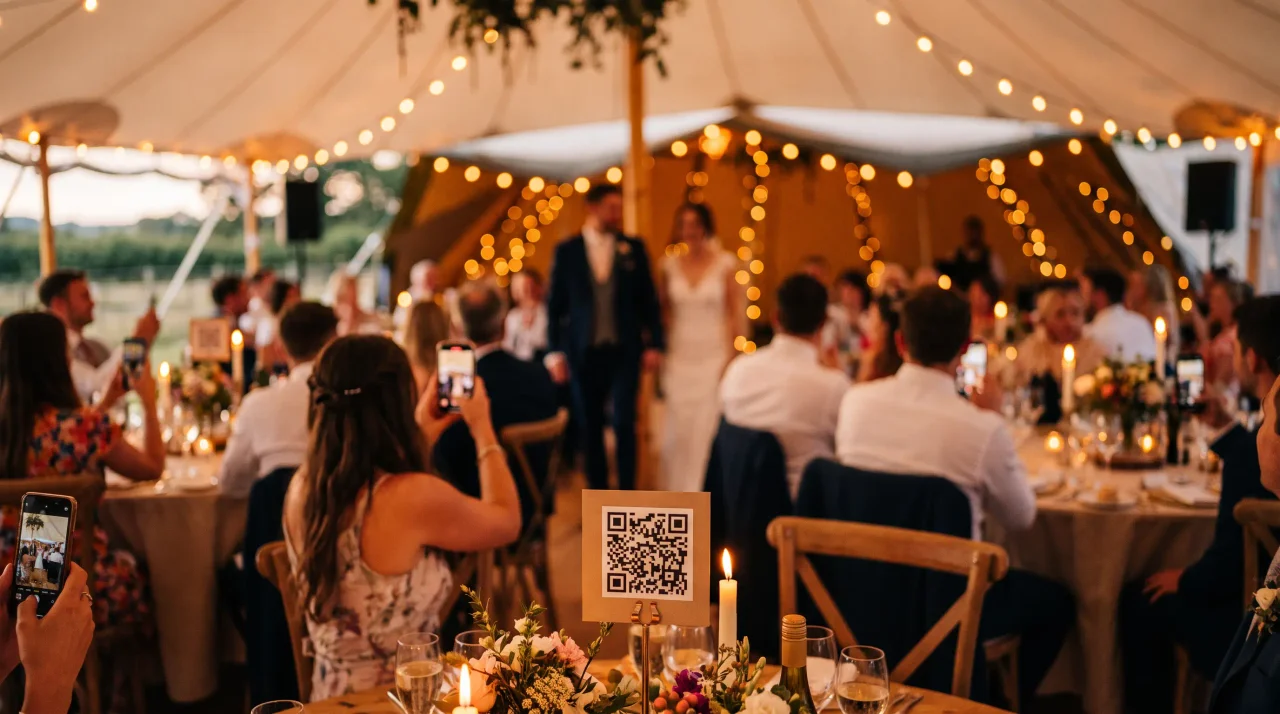
The most effective way to collect guest photos at a wedding is a printed QR code on the tables that opens an upload page in the guest's browser -- no app, no login. Across the six common approaches ranked below, one pattern holds: the fewer steps between a guest and the upload, the more photos you end up with.
Your photographer captures the day from the outside. Your guests capture it from the inside -- the table crying with laughter during the speeches, the dancefloor at midnight, the look on your face you never saw. The trouble is those photos scatter across a hundred camera rolls you will never see, and the usual fixes collect a fraction of what was actually taken. This guide closes that gap, and it starts by being honest about the methods that do and do not work.
The reason most weddings end up with so few guest photos is not lack of enthusiasm -- people take plenty. It is friction. Every step you ask of a guest after the event (open an app, find the folder, compress the files, remember at all) is a step where most of them quietly drop off. The method that wins is simply the one that asks the least.
The six ways to collect wedding photos, ranked
Here is an honest read on the six common approaches, scored on the only thing that matters: how many photos you actually end up with. Most of the dedicated tools in the last two rows are compared in detail in our best event photo apps roundup.
| Method | Effort for guests | What you get | Verdict |
|---|---|---|---|
| "Text or email me later" | High -- after the event, from memory | A trickle, over weeks; disorganised | Worst -- most never get sent |
| Social media hashtag | Medium | Public, compressed, misspelt tags | Weak -- low quality, privacy cost |
| Google Photos / iCloud shared album | Medium -- account & sign-in needed | Account walls exclude guests; no moderation | Limited -- see why |
| Disposable cameras | Low to use, high cost & wait | 24-27 shots, poor in low light, dev cost | Charming but tiny volume |
| Wedding app (guest download) | High -- install for one night | Good once installed; many never do | App barrier sheds contributors |
| QR code, no app (e.g. Gathmo) | Lowest -- scan & upload in browser | Photos, video, voice; full-resolution | Best -- highest participation |
The pattern is clear: the fewer steps between a guest and the upload, the more you collect. A printed QR code that opens straight in the browser -- no app, no login -- is the lowest-friction option, which is why it consistently gathers the most.
How many photos should you actually expect?
More than you think are taken -- and far fewer than you think survive. Popsa’s 2026 "Memory Economy" report says around 70% of camera-roll photos are never looked at again, and the same survey found half of people say their camera roll actively stresses them out. A wedding generates a burst of photos that then sink, unsorted and unshared, to the bottom of everyone’s phone. The job is not to make guests take more photos -- it is to collect the ones already being taken before everyone goes home.
And do not worry that guests will not know what to do with a QR code: QRKit summarizes TEAM LEWIS research reporting that 68% of consumers used a QR code at least once in the past year. Your guests already scan codes on restaurant menus -- a table card at your wedding is the same muscle memory.
Get the QR sign right (this is where most setups lose photos)
A QR code only works if guests see it and it scans on the first try. A few rules make that reliable:
- Put it in five or more places. A card on every table, plus the welcome sign, the bar, the photo corner and a line on the order of service. Platform data suggests codes in several locations gather roughly twice as many photos as one sign by the door.
- Size it for the distance -- the 10:1 rule. A code read from across the room (about 3 m) wants to be roughly 30 cm wide; a table card scanned at arm’s length can be about 3 cm, but bigger is always safer.
- Leave a quiet zone. Keep a clear blank margin at least four "modules" (four dots) wide on all sides, or scanners struggle to lock on. Do not crowd the code with decoration.
- Keep it dark-on-light and matte. A dark code on a light background scans best; matte stock avoids the glare that defeats a code under venue lighting.
- Use a human prompt. "Add your photos to our wedding story" beats "Scan to access photo-sharing platform." Add one reassuring line: "No app, no login -- just scan."
- Test-print one before you print fifty. Scan it from where a guest will stand, under the lighting you will actually have.
Most uploads do not happen during the reception -- they happen the day after, once people are home and scrolling through their phones. Keep the album open and send one thank-you message the next morning with the link ("relive the day / add any photos you took"). That second wave is often as large as everything collected on the night. One DJ or MC mention during the evening is plenty; repeating it just annoys people.
Do not forget voice and video
The keepsake couples replay most a year later is rarely a posed portrait -- it is a 20-second voice note from a grandparent, or a video wish from the friend who flew home early. If your tool collects voice and video messages through the same QR code, you capture the day in your guests’ own voices, not just their cameras. Put a specific prompt on the card ("How did you two meet?") and you will get warmer, longer messages than a blank "leave a message" invite.
Keep it private and GDPR-friendly
A wedding album is personal data -- faces, voices, video. Pick a tool that lets you moderate uploads before they hit a live wall, that stores media in the EU if your guests are European, and that has a clear retention window and deletion process. Gathmo does all three by default, on every plan; the full reasoning is in our GDPR guide for EU event media.
Three neighbouring questions come up while you are choosing. Which tools are worth shortlisting at all is covered in the best wedding guest photo apps of 2026. Whether to put disposable cameras on the tables instead has cost maths that has moved since 2024. And if the app you already booked has shut down, there is a recovery route for the photos and a replacement list.
What you will need
- A free Gathmo account
- A printed QR sign (Gathmo generates it for you)
- About five minutes
Create your wedding album
Sign up free and create your event in under a minute -- name it, set the wedding date, and choose the wedding event type. You get a private dashboard immediately, no credit card required. See how Gathmo works for the full overview.
Choose what guests can share -- and turn on moderation
Toggle on photos, video and voice (most couples enable all three). Switch on host approval if you want to review uploads before they appear on the live wall -- sensible for a wall projected during dinner. Voice is included on every tier; on paid plans there is no length cap.
Print and place your QR signs
Gathmo generates a print-ready table card and an A4 poster with a clear prompt already on them. Put a card on every table, a poster by the entrance, and one at the bar -- the five-plus-locations rule from above. Our wedding QR code guide covers invitations, sizes and print rules in detail.
Watch it build, and add a live wall if you like
Uploads appear in your dashboard in real time -- a genuinely lovely thing to watch between courses. On the Celebrate plan (69 EUR) and above you can project a live photo wall, which itself drives more uploads: guests see their photos appear and want in.
Download every original -- and send the day-after link
After the wedding, download every photo, video and voice note in a single full-resolution ZIP (included on all paid plans). Then send guests the album link the next morning to trigger that second wave of uploads. Back up your archive to two places -- these are irreplaceable.
Quick recap
- Create the free album and set the wedding date and type
- Turn on photos, video and voice -- plus host approval if you want it
- Print the QR card and poster; place them in five or more spots
- Use a human prompt and the 10:1 size rule with a clear quiet zone
- Add a live wall (Celebrate, 69 EUR) to lift participation, if you want one
- Download every original in one ZIP and send the day-after link
Frequently asked
Use a QR-code photo album. You print a code, guests scan it with their phone camera, the upload page opens in their browser, and they add photos, video and voice notes in seconds -- no app to install and no account to create. This is the highest-participation method because it removes every step between the guest and the upload. With Gathmo you create the album free, print the generated QR sign, and everything lands in one private dashboard you can download in full resolution.
Aim for five or more locations: one card on every table, plus the welcome sign, the bar and the photo corner, and a line on the order of service or invitation. Codes in several places gather noticeably more photos than a single sign by the door, because guests upload at the natural pauses -- waiting for a drink, sitting down, glancing around between conversations.
Use the 10:1 distance-to-size rule. A code scanned from across the room (about 3 m) should be roughly 30 cm wide; a table card scanned at arm’s length can be about 3 cm, though bigger is always safer. Always leave a quiet zone -- a clear margin at least four modules wide on every side -- and print dark-on-light on matte stock so venue lighting does not cause glare. Test-print and scan one before printing the full batch.
At least 30 days, because most uploads happen in the days after the wedding, not during it. Keep the link live and send guests a thank-you message the morning after with the album link -- that second wave is often as big as everything collected on the night. On Gathmo, retention runs from 30 days on the free plan up to a year on the top tier; download your full-resolution archive within the first week regardless.
Three things move the needle most: remove the app barrier (a no-app QR code), make uploading visible (a live photo wall so guests see photos appearing and want to join in), and follow up the next day with the album link. A specific, friendly prompt on the sign ("Add your photos to our wedding story") and one MC mention during the evening do the rest. Recruiting two or three tech-comfortable guests to help older relatives also reliably lifts participation.
For collecting from a roomful of guests, yes -- mainly because of participation and access. A QR album opens straight in the browser with no login, while contributing to a Google Photos shared album requires guests to be signed into a Google account, which quietly excludes anyone without one. A dedicated album also gives you moderation, a defined retention window and EU hosting; a Google shared album has none of those. We break the comparison down in why Google Photos and Drive aren’t the best way to collect event photos.
 Comparison
voxu.fm vs Gathmo: which QR wedding guestbook is right for you?
voxu.fm is a focused QR wedding guestbook; Gathmo captures the whole event -- photos, video, voices and a live wall -- from one code. An honest head-to-head, including where voxu wins.
 Comparison
knipsmig alternative: Gathmo vs knipsmig, compared honestly
knipsmig is a clean, well-priced QR photo and video collector. Gathmo adds an audio and video guestbook, a live wall and named EU hosting. An honest side-by-side.
 Guide
GuideYour wedding photo app shut down? How to recover your photos -- and what to use in 2026
The Guest, Eversnap and Capsule are gone. Here is how to get your photos out of a discontinued app -- and the no-app QR tools that replaced them.