Gathmo vs Google Fotos
Gathmo is the better choice if the evening itself matters: guests scan a code and open 1 album, leave a spoken message, and the hosts approve what reaches the screen in the room. Google Photos is the better choice if you want it free and forever — a shared album costs nothing, never expires, and its search across faces and places is better than anything we offer or anything else on this list. The catch is not quality, it is shape: Google Photos is your own library with other people let in, so the 15 GB it starts with is shared with your Gmail and your Drive, and there is nothing in it that records a voice or drives a screen at a venue.
Google's limits and wording verified on support.google.com/photos and one.google.com, 21 August 2026, quoting Google's own sentences. No Google One price is quoted anywhere on this page: Google sets those per country, and fetched from here the plans page answered in Nigerian naira.
A library you let people into, or an evening built to be shared
A Google Photos shared album is free, holds photos and video, and stays for as long as the account does. Anyone with the link can look at it — Google's words are “anyone with the link can view them”. It is the most widely used photo product on earth, its search is genuinely excellent, and for a couple who simply want the pictures gathered somewhere permanent it is hard to argue against. It has no voice recorder, no venue screen and no approval step, because it was built as a place to keep your own photos rather than to run an event.
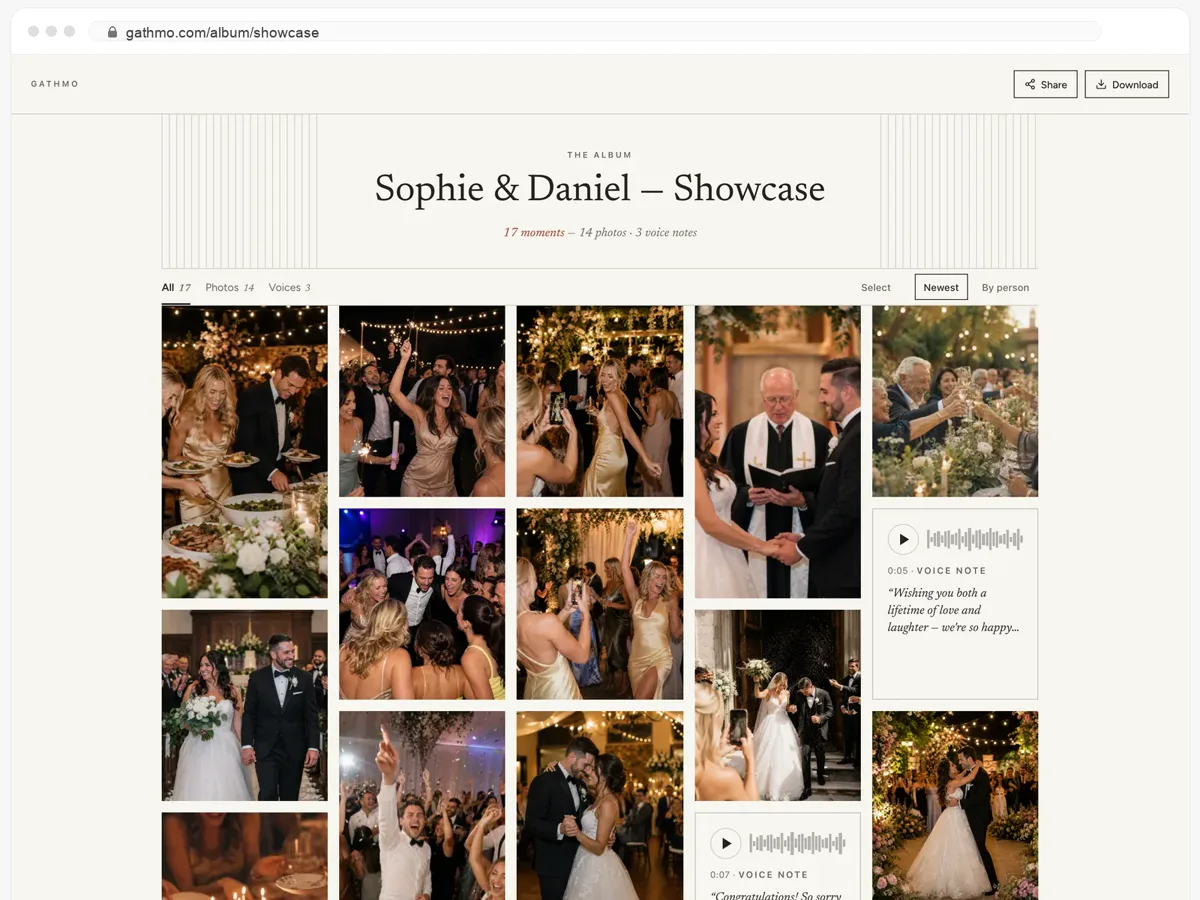
Gathmo is built for one evening and the weeks after it. Guests scan a printed code, upload without signing in to anything, record a spoken message if they want to, and watch the album fill while the party is still going. The hosts approve what appears on the screen in the room, everything downloads as a ZIP at original quality, and the album is online 90 days on Essential, six months on Celebrate and a year on Grand — and then it closes.
Gathmo vs Google Fotos, feature by feature
| What you can do | Gathmo | Google Fotos |
|---|---|---|
| What lands in the album | ||
| What guests can send | Photos, video and voiceAll three in one album, on one timeline | Photos and videoBoth, at full quality if you keep original quality on |
| How much guests can send | Unlimited with every paid planPhotos, videos and voice notes; the plan sets the storage, from 50 GB | As much as the storage holds15 GB free, and Google states it is shared across Gmail, Drive and Photos |
| Voice messages | Every plan, including freeRecorded in the browser, beside the photos | Not offeredGoogle records voice in its other apps; nothing puts a recording into the album |
| The day itself, and after | ||
| On a screen at the venue | From CelebrateApproved photos and messages on a screen | Not offeredThere is no venue mode; a shared album is a page you open |
| Approving what appears | Every paid planThe hosts approve each item before it reaches the screen | Afterwards, not before, on every planThe owner can remove what was added; nothing describes approving it first |
| The album afterwards | 90 days to a yearThe plan decides; the album is live that whole time | For as long as the accountNo event window at all, and nothing to renew |
| Guests who cannot come | Live stream, on GrandThey watch as it happens and send a voice note back | They can see it, on every planThe link works from anywhere, but there is nothing live to watch |
| App for guests | Not neededOpens in the phone browser after a scan, with nothing to sign in to | Viewing needs nothing; adding is described as an accountGoogle says “anyone with the link can view them”, and describes a contributor's “profile image” changing to “their account profile photo or initial” |
| What you get and pay | ||
| Keeping the originals | YesEverything downloads as a ZIP at original quality, from Essential | Yes, on every planThey are in your library, and Google Takeout exports the lot |
| What it needs from you | A table and a printed codeFour sign templates and a 300-dpi PDF | A link and your own signageYou write the wording, make the QR code and print it yourself |
| Starting price | Free for 60 items60 photos, videos or voice notes at no cost; then a one-time price per event, shown in your own currency below | Free, with 15 GBShared with Gmail and Drive; beyond that Google One, priced per country on Google's own plans page |
More on these features: Live photo wall · Audio guestbook
Two rows say “Not offered” and both mean the same thing: Google Photos was built to keep your own pictures, and a voice recorder or a venue screen was never part of that idea. It is not a shortcoming, it is a different product. The row on accounts is worded carefully on purpose — Google's help says viewing needs only the link, and describes adding in terms of an account, but nowhere states in one sentence what someone without an account can and cannot do. We quote what Google says rather than filling the gap ourselves. Two rows go to Google, and on price and permanence it is not close.
Try it on your own event
Where Google Fotos is ahead
Two things, and the first one is free, which is difficult to beat.
Free, and it never closes
A shared album costs nothing and lasts as long as the Google account. Our albums are online 90 days, six months or a year and then they are not. If what you want is the pictures somewhere permanent and free, that is the whole argument and Google wins it.
The search is better than ours
Google finds faces, places and objects across a library of any size. Type a name, get every photo of that person from the whole evening. We do not have that, and neither does anything else on this list. For finding one specific picture two years later, Google Photos is the better tool by a distance.
Where the two differ
The voices
Gathmo records a spoken message in the browser on every plan, including the free one, and puts it on the same timeline as the photos — the toast nobody filmed, the message from someone who could not come.
Google Photos has no recorder. Google records voice in Messages, in Recorder and in Keep, and none of those put the result in the album. A guest would have to record elsewhere and upload a file, which at a party means it does not happen.
The room seeing the room
From Celebrate, approved photos and messages appear on a screen at the venue while the party is happening, and the hosts decide what goes up before it does.
A shared album is a page each person opens on their own phone. There is no venue mode, and no approval step before something is visible to everyone else — the owner can delete an upload afterwards, which is a different thing at 11 in the evening.
Whose storage it is
A Gathmo plan's storage belongs to the event. Nothing a guest uploads competes with your inbox, and the plan states the space in GB before you start.
Google gives every account 15 GB and states it is shared across Gmail, Drive and Photos. A hundred guests filming an evening lands in the same 15 GB as six years of email — which is fine until the day it is not, and that day arrives without warning.
Everything above about Google comes from support.google.com/photos and one.google.com, checked 21 August 2026, quoting Google's own sentences. Google does not sell an event product and has never claimed to — this page exists because a shared album is what most couples reach for first, not because Google competes for the same buyer. On price, permanence and search it is ahead of us and we have said so. One thing we have deliberately not done: our own competitor notes assert that guests need a Google account to contribute, and Google's documentation does not actually say that in so many words, so neither do we. Tell us if anything here is out of date.
Reviewed by Martin Freiwald, founder of Gathmo
Sources reviewed: support.google.com | support.google.com | support.google.com | support.google.com
Questions people ask before switching
Can I just use a Google Photos shared album for wedding photos?
Yes, and for a lot of couples it is the right call: it is free, it never expires, and Google's search will find any picture years later. What you do not get is a way for guests to record a spoken message, a screen at the venue, or an approval step before something is visible. If those do not matter to you, use the shared album and keep the money.
Do guests need a Google account to add photos?
Google does not state this plainly either way, so neither will we. Its help says “anyone with the link can view them”, and where it describes someone adding photos it says their “profile image changes to their account profile photo or initial” — adding is described in account terms, viewing is not. With a Gathmo guest link there is nothing to sign in to at all, which is the difference we can state without guessing.
How much can guests upload to a shared album?
As much as the storage holds. Google gives every account 15 GB and states it is shared across Gmail, Drive and Photos, so an evening of guest video competes with your own mailbox. Gathmo takes 60 items free, then unlimited photos, videos and voice notes on every paid plan, with storage from 50 GB that belongs only to the event.
Is Google Photos cheaper?
Free is cheaper, yes. A shared album costs nothing at all, and if 15 GB is enough for your day it stays that way. We are not going to pretend otherwise — what a paid plan buys you here is the voice recording, the screen, the approving and the printed signage, not more space per euro.
Can guests leave a voice message in Google Photos?
No. Google Photos has no recorder, and the voice features in Google's other apps do not put a recording into an album. A guest would have to record in a separate app and then upload the file, which is two steps too many in the middle of a party. Gathmo records in the browser on every plan, including the free one.
Can I use both?
Yes, and it is what we would suggest. Use Gathmo for the evening — the album filling in real time, the voices, the screen — then download the ZIP at original quality when it closes and put that in Google Photos, where it will stay and stay searchable.
Your guests get the whole album — and can download it.
- Photos, videos and voice messages, all on one page.
- Guests open the link and download whatever they want.
- Public, or behind a password — you decide.
How the two price it
Google's answer is free, and that is not a trick: a shared album costs nothing, and every Google account starts with 15 GB — shared, in Google's own words, across Gmail, Drive and Photos. Past that there is Google One, and we quote no figure for it on purpose, because Google prices it per country and the plans page answered our request in Nigerian naira; there is no number we could print that would be true for a reader in eight languages. Gathmo charges once per event. The free tier takes 60 items so you can scan your own code and see the guest side before paying, and each paid plan sets the storage, the clip length, the screen at the venue, the live stream and how long the album stays online — in your own currency, in the table on this page. The comparison only really has one question in it: whether you are collecting pictures or running an evening. For collecting, Google is free and permanent and better at finding things later. For the evening — the voices, the screen, the approving — there is nothing in a shared album to use.
From $49. Pay once, per event.
No subscription for hosts. Free to start, upgrade only when you need more.
- 60 photos, videos & voice notes
- 5 GB storage included
- Unlimited guests — no app needed
- 30 days album
- Video up to 30 sec · voice 30 sec
- No Gathmo badge on your media
- No original-quality download
- Unlimited photos, videos & voice
- 50 GB storage included
- Download all originals (ZIP)
- No Gathmo badge on your media
- 90 days album
- Video up to 5 min · voice Unlimited
- Host moderation tools
- Everything in Essential
- 100 GB storage included
- Live photo wall at the venue
- 6 months album
- Video up to 10 min · voice Unlimited
- Priority support
- Everything in Celebrate
- 250 GB storage included
- Live stream for guests who can’t attend
- Voice messages transcribed for you
- Custom link — gathmo.com/c/your-name
- 1 year album
- Video up to 15 min · voice Unlimited
Using both, which is usually the right answer
Decide what the night needs
If nobody needs to hear a spoken message and nothing needs to go on a screen, a shared album does the job for nothing. If either of those matters, no amount of storage fixes it.
Start a free Gathmo event
Name, date, done — about two minutes, no card. The free tier takes 60 photos, videos or voice notes: enough to scan the code yourself and hear what a voice message actually sounds like coming back.
Print the code
Four sign templates with your own wording and a 300-dpi PDF. With a shared album you would be making that sign yourself, and a guest who has to be told a URL out loud is a guest who does not upload.
Put the ZIP in Google Photos afterwards
This is the combination we would actually recommend. Run the evening in Gathmo, download everything at original quality when the album closes, and upload it to Google Photos to keep — the evening from one, the permanence and the search from the other.
More comparisons
- Gathmo vs GuestpixNearly the same product, minus the voices
- Gathmo vs KululuKululu counts uploads and closes early; Gathmo counts nothing
- Gathmo vs voxuvoxu keeps the messages longer; Gathmo keeps more of the day
- Gathmo vs GuestCamGuestCam gives you longer; Gathmo lets you try first and approve after
- Gathmo vs GuestlenseGuestlense prints things; Gathmo records the voices
- Gathmo vs WediboxWedibox plans the wedding; Gathmo keeps what people said
- Gathmo vs qrFotosqrFotos keeps it longer; Gathmo takes the voices from the first plan
- Alboda alternative: Gathmo vs AlbodaChoose Alboda for a wedding design suite and no-expiry album; choose Gathmo for free mixed media and unlimited paid uploads
- Gathmo vs WhatsApp GroupAlbum for memories, chat for coordination
- Gathmo vs. LINE AlbumEvent album for open participation, LINE for a familiar group
- FridaySnap alternative: Gathmo vs FridaySnapChoose FridaySnap for 12 months and a slideshow at one price; choose Gathmo to start free and select the plan depth
- EventSnap alternative: Gathmo vs EventSnapChoose EventSnap for direct-to-Drive storage; choose Gathmo for a self-contained mixed-media album
- Eventoly alternative: Gathmo vs EventolyChoose Gathmo for a free event; Eventoly for an entry-plan slideshow and longer storage
- EXID QR gallery alternative: Gathmo vs EXIDChoose Gathmo for voice and a larger free event; EXID for original files and a six-month slideshow
- Eventocam alternative: Gathmo vs EventocamChoose Gathmo for German setup and moderation; Eventocam for challenges and a larger split free allowance
- Scene alternative: Gathmo vs SceneChoose Gathmo for multimedia and browser setup; Scene for an offline disposable-camera experience
- POV alternative: Gathmo vs POVChoose Gathmo for multimedia and browser setup; POV for disposable-camera controls
- Picbook alternative: Gathmo vs PicbookChoose Gathmo for voice, moderation and longer access; Picbook for a compact €19 LIVE TV package
- Gathmo vs. After The ToneOne mixed-media album or one memorable handset
- WedShoots Alternative: Gathmo vs WedShootsWedShoots for a free social photo app; Gathmo for a no-app multimedia flow
- WedPicsQR Alternative: Gathmo vs WedPicsQRWedPicsQR for multiple pages; Gathmo for voice and moderated display
- PixBearer alternative: Gathmo vs PixBearerChoose PixBearer for untouched files in your Drive; choose Gathmo for a managed photo, video and voice album
- Snapeen alternative: 50 free photos or Gathmo?Choose Snapeen for the larger free test and design tools; choose Gathmo for voice in the same album
- Dearest Events alternative: Gathmo vs Dearest EventsDifferent strengths, not a universal winner
- PartyCam alternative: Gathmo vs PartyCamChoose PartyCam for a small filtered camera experience; choose Gathmo for unlimited guests and mixed media
- WedUploader Alternative: Gathmo vs WedUploaderWedUploader for your own Drive and repeat events; Gathmo for one mixed-media event album
- Our Event Album alternative: Gathmo comparedChoose Gathmo for a free start and voice; choose Our Event Album for one simple six-month slideshow bundle
- Guesticon alternative: Gathmo comparedChoose Gathmo for mixed media and explicit retention; choose Guesticon for an integrated wedding suite
- Wedding Memory alternative: Gathmo comparedChoose Gathmo to test photo, video and voice for free; choose Wedding Memory for its named 12-month wedding album
- Gathmo vs. VoastOne mixed-media browser album or one guided video booth
- MyMillionSnaps alternative: Gathmo vs MyMillionSnapsMyMillionSnaps for 12 months, slideshow and games; Gathmo for a usable free event, moderation and plan choice
- iCloud/AirDrop alternative: Gathmo comparisonUse Apple for a lasting library or a few originals; use Gathmo to collect from the whole room
- Gathmo vs a Dropbox file requestOne collects files; the other holds an evening
- Gathmo vs Easy Wedding AlbumOne flat price against a plan that fits the event
- Gathmo vs LifeOnRecordOne album with voices in it, or the voices done properly on their own
- Gathmo vs QuickPixThe cheapest way in, against the things that happen on the night
- Gathmo vs a photo boothThe booth gives you a night; the QR code gives you the day
- Gathmo vs an audio guestbook phoneOne handset, or the phone already in everyone's pocket
- White-label vs build your ownMonths to build, and then it is yours to keep running
Start your album, free
Set up the event, print the code, and hear what comes back. No card to start.